

If you’ve been shopping for a new television, you’ve probably come across two names that sound almost identical: Google TV and Android TV. Both are built by Google, both power smart televisions, and at first glance they can even look quite similar. That is why choosing between them often feels more confusing than it should.
The reality is that Android TV is the operating system, while Google TV is a newer interface built on top of it. They share the same foundation, but the experience of using them every day is noticeably different. If you’ve ever searched for Google TV vs Android TV, wondered about the difference between them, or even compared Google TV vs Smart TV, you’re certainly not alone.
This guide explains what Google and Android TV are, how they differ, and which platform is likely to suit your household better.
What is Android TV?
Android TV is Google’s original smart TV operating system, first launched in 2014. Built on the same foundation as the Android software running on most of our phones, it took televisions from being just screens to actual connected devices, ones that could run apps, stream content, and even respond to voice commands through Google Assistant.
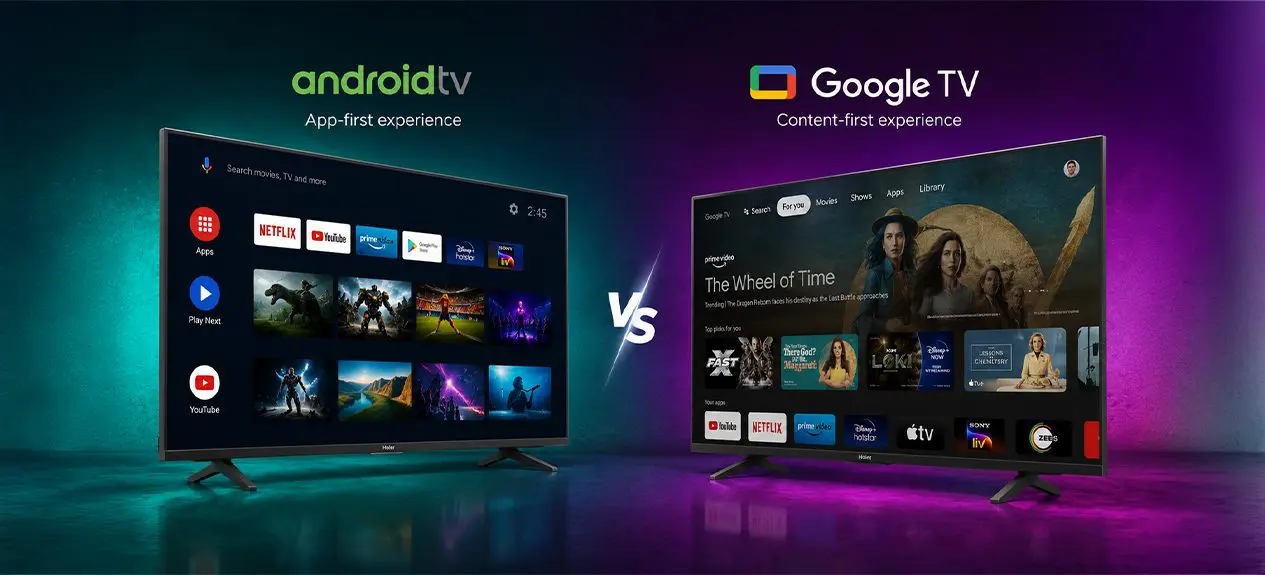
The Android TV experience is built around an app-first home screen. When you turn on the television, you’re greeted by a grid of app icons: Netflix, YouTube, Prime Video, and so on, much like the home screen of a phone. You choose an app, then browse for something to watch within it. It’s simple, customizable, and familiar to anyone who has used an Android phone.
What is Google TV?
Google TV isn’t a whole new operating system built from the ground up. It’s a fresh interface layered on top of the same Android TV foundation that’s been around for a while. Google rolled it out in 2020, first on the Chromecast with Google TV, and it’s since turned into the default interface on most new Google-powered TVs.
The real shift with Google TV is moving away from an app-first setup toward something more content-first. Instead of hopping between individual apps to find something to watch, the home screen pulls recommendations from all your connected streaming services into one “For You” tab. It picks up on your viewing habits, keeps a single watchlist across everything you use, and sorts content by genre or mood rather than by which app it happens to live in. On top of that, Google TV plugs deeper into Google’s ecosystem too, bringing in smart home controls, personalized profiles for each family member, and tighter Google Assistant support.
Google TV vs Android TV: The Core Differences
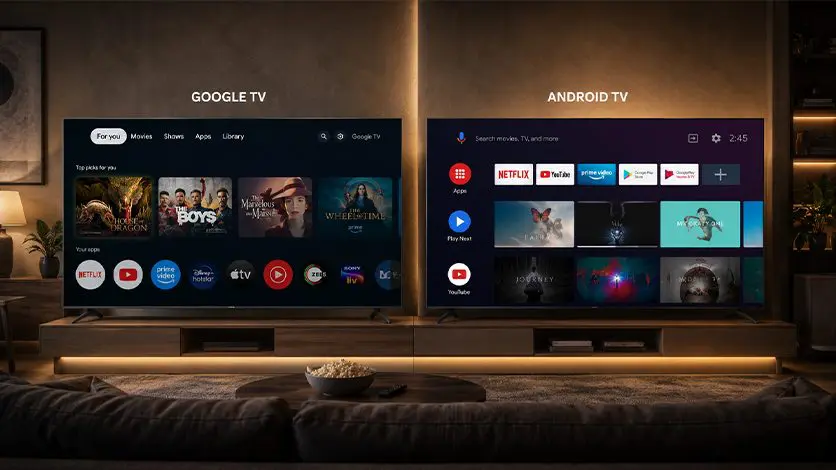
Think of these two platforms as different layers rather than completely separate systems. Android TV provides the operating system, while Google TV builds on that same software with a more modern, content-first experience.
| Feature | Android TV | Google TV |
| Home screen | App-based interface | Personalised content-first interface |
| Content discovery | Browse apps individually | Recommendations across multiple apps |
| User profiles | Basic support | Individual personalised profiles |
| Watchlist | Limited | Integrated Google Watchlist |
| Voice Assistant | Google Assistant | Google Assistant with deeper integration |
| Smart home control | Supported | Better integrated with Google’s ecosystem |
| Overall experience | App-first | Content-first |
The important thing to remember is that the difference between Google TV and Android TV isn’t about what apps they support. Both run the same Android-based software underneath. The real difference is how they help you discover and enjoy content every day.
Which One Should You Choose?
If your TV habits mostly revolve around Netflix, YouTube, or other streaming apps, either platform will do the job well. The differences start to matter in everyday use, especially if you spend more time browsing for something to watch than opening a specific app.
Choose Google TV if:
- You prefer personalised recommendations on the home screen.
- Multiple people use the TV and want individual profiles.
- You regularly use Google Assistant or other smart home devices.
- You want the latest Google features and software updates.
Choose Android TV if:
- You prefer a familiar app-first interface.
- You mainly open the same streaming apps every day.
- You don’t need personalised content recommendations.
- You’re happy with a simple smart TV experience.
Explore our Smart TV Range
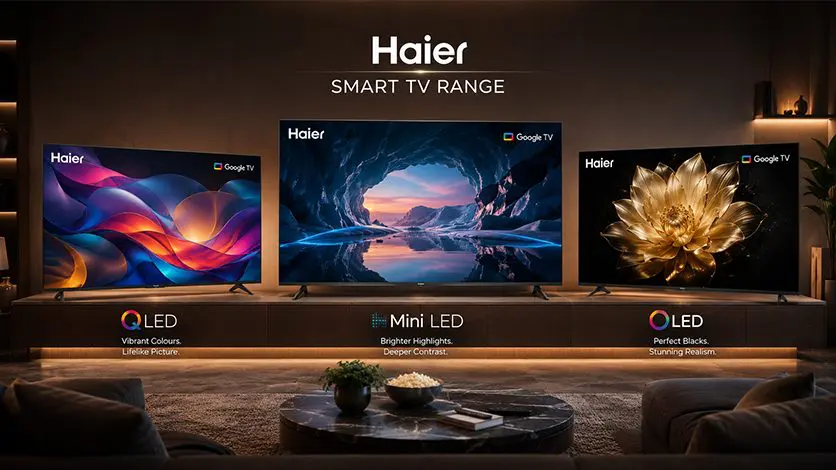
Once the platform decision feels clearer, the next step is finding a TV that brings the experience together. At Haier, our Smart TV range includes models running on both Google TV and Android TV, spread across different display technologies so there’s a TV that fits your home and how you like to watch.
If you’re looking for an immersive big-screen experience, the Haier S90 QLED 254cm (100) Google TV | AI Center Max combines a 100-inch QLED display with Google TV, AI Centre Max, Dolby Vision IQ and immersive audio, making it well suited for larger entertainment spaces.
For those who prefer cinematic picture quality, the Haier C95 OLED 165cm (65) Google TV | Sound By Harman Kardon pairs OLED technology with Google TV, Dolby Vision IQ, Dolby Atmos and Harman Kardon-tuned sound for an engaging movie and streaming experience.
Whichever model you choose, Google TV brings together personalised recommendations, Google Assistant, Chromecast built-in, Google Gemini, and seamless access to thousands of apps, so the experience stays familiar across the range.
Want help finding the right Google-powered TV for your home?
Read more: How Google-Based TV Recommendations Personalize Your Viewing Experience
Beyond Streaming: A Smarter Connected Home
Entertainment is only one part of a modern smart home. Haier’s HaiSmart ecosystem takes the experience further, connecting compatible Haier appliances through a single platform so your entertainment and your home aren’t living in separate worlds.
Alongside Google TV, HaiSmart lets you manage supported air conditioners, refrigerators, robot vacuum cleaners, and other connected devices, all from one place, without needing to jump between apps. As more homes fill up with smart devices, this kind of integration is what makes life easier, bringing entertainment and everyday home management together under one connected roof.
Conclusion
At its heart, the debate around Google TV vs Android TV isn’t about picking between two rival platforms; it’s about understanding how one builds on the other within Google’s smart TV ecosystem. Android TV laid the groundwork with its familiar, app-driven approach, while Google TV takes that same foundation and layers on a more personalised, content-first experience designed to feel effortless from the moment you switch on the screen.
Whether you’re replacing an aging television or buying your first smart TV, knowing the difference between Google TV and Android TV takes the guesswork out of the decision and points you toward a platform you’ll actually enjoy using every day. Explore our range of Google TV and Android TV models to find the television that best matches your viewing habits, home, and budget.
FAQs
What is the difference between Google TV and Android TV?
Google TV is a newer interface built on top of Android TV. While Android TV focuses on an app-based home screen, Google TV organises content from multiple streaming services into personalised recommendations, making it easier to discover what to watch.
Is Google TV the same as Android TV?
Not exactly. Google TV and Android TV share the same underlying operating system, but Google TV adds a redesigned, content-first interface with personalised profiles, improved recommendations, and deeper Google Assistant integration.
Do Google TV and Android TV support the same apps?
Yes, both platforms support apps from the Google Play Store, including popular streaming services like Netflix, Prime Video, YouTube, Disney+ Hotstar, and many more. The main difference is how those apps and their content are presented.
Which is better for streaming apps like Netflix and Prime Video?
Both platforms run streaming apps equally well, but Google TV makes discovering content easier by bringing recommendations from different apps together on a single home screen instead of requiring you to open each app individually.
Is Google TV more secure than Android TV?
Both platforms receive security updates from Google, but Google TV generally receives newer features and ongoing platform improvements first. Since it is Google’s primary TV platform, it is likely to stay updated and supported for longer than Android TV.